Pearl Drop
How to Play
Pay Lines
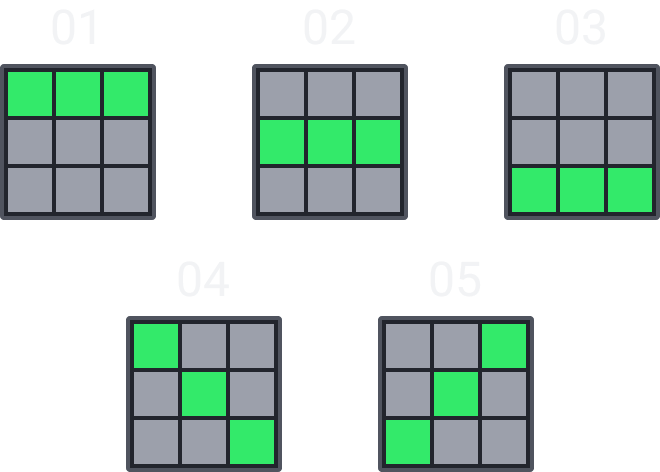
- Pearl Drop is a slot game with 5 paylines.
- All symbols pay from left to right on adjacent reels.
- All wins are multiplied by the bet per line.
- When winning on multiple paylines, all wins are added to the total win.
Symbol Payout Table

{symbol1_odds}

{symbol2_odds}

{symbol3_odds}

{symbol4_odds}

{symbol5_odds}

{symbol6_odds}
Scatter Symbol

- All scatter symbols that land will award their displayed amounts.
- Each Scatter symbol value may range from {min_multiplier}x of the total bet amount up to {max_multiplier}x of the total bet amount.
- Land 3 or more scatter symbols triggers FREE SPINS.
Free Spins
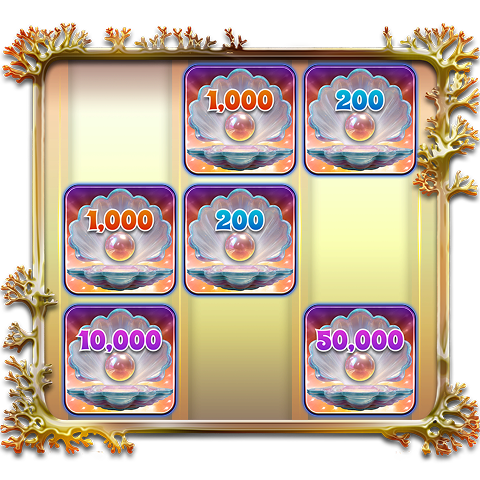
The displayed amount will vary based on the bet amount. Images are for illustrative purposes only.
- Land at least 3 scatter symbols to trigger FREE SPINS.
- 3 scatters trigger {free_spin_count_3} Free Spins.
- 4 scatters trigger {free_spin_count_4} Free Spins.
- 5 scatters trigger {free_spin_count_5} Free Spins.
- During Free Spins, only scatter symbols appear.
- All scatter symbols that land will award their displayed amounts.
- The scatter symbols that triggered Free Spins also award their displayed amounts.
PEARL DROP
- The theoretical Maximum Payout: {max_payout}x
- Minimum Bet: {min_bet} {currency}
- Maximum Bet: {max_bet} {currency}
- The theoretical RTP of this game is {rtp} %
- This is a Low to Mid volatility game
- Malfunction voids all pays and plays
- The maximum win amount is limited to {max_payout}x bet, If the total win of a round reaches {max_payout}x bet the round immediately ends, win is awarded up to the cap and all remaining features are forfeited.
How to Play

Bet Selection
- Click to open the bet panel and choose your preferred bet amount.

Bet Adjustment Button
- Click to adjust the bet value.

Spin Button
- Click to start the game.

Turbo Button
- Click to speed up the gameplay.

Auto Spin Button
- Click to open the Auto Spin panel and select the number of automatic spins. You can stop auto play at any time.

Audio Button (Outside Menu)
- Click to mute or unmute all game audio.

Menu Button
- Click to open the game menu.

Rule Button
- Click to view the game rules and paytable.

Music Button
- Click to mute or unmute background music.

Sound Button
- Click to mute or unmute sound effects.

History Button
- Click to view game history.
Game Version v1.0
